Your GarageBand Install Is Hiding Gigabytes of Instruments — Parsing the EXS Format
Every Mac with GarageBand’s sound library installed is sitting on multiple
gigabytes of professionally recorded instruments: a Steinway grand, drum kits
tracked in real rooms, electric pianos, a Mellotron’s actual tape banks,
strats, acoustic guitars. They live in Apple’s EXS24 sampler format —
.exs instrument files plus audio containers — with no export button and no
public documentation.
This post reverse-engineers the format in about 60 lines of Python. The parser itself is pure Python and runs anywhere; EXS files also turn up in Logic sample libraries and third-party instrument packs, so the knowledge travels. (On the legal side: Apple’s license lets you use this content in your own musical compositions, including commercial ones. It does not let you redistribute the samples themselves — extract for your own pipeline, not for a sample pack.)
Where the bodies are buried
/Library/Application Support/GarageBand/Instrument Library/Sampler/
├── Sampler Instruments/        <- the .exs files (the "map")
│   ├── Live Rock Kit.exs
│   ├── Steinway Grand Piano.exs
│   └── ...
└── Sampler Files/              <- the audio (often *_consolidated .caf blobs)
Logic’s larger library uses the same layout under
/Library/Application Support/Logic/. The .exs file is the interesting
one: it maps keyboard zones to byte ranges inside the audio files.
The format, reverse-engineered
An .exs file is a flat sequence of chunks. Each chunk is an 84-byte header
followed by size bytes of payload:
offset  size  field
0       4     flags (chunk kind lives in the high byte)
4       4     data size (u32, little-endian)
8       4     chunk id
12      4     padding
16      4     magic: 'TBOS'  ("SOBT" reversed — classic Apple)
20      64    name, NUL-terminated ASCII
84      size  payload
Three chunk kinds matter:
- kind
0x01— zone. One playable region: root note (the pitch the sample was recorded at), key range, velocity range (which recording answers a soft hit vs. a hard one), and — the crucial part — exact sample-frame start/end offsets into a referenced audio file. - kind
0x02— group. Articulation names (“hits”, “rimshot”, etc.). - kind
0x03— sample. An audio file reference by name.
The whole parser:
import struct

def parse_exs(path):
    data = open(path, "rb").read()
    zones, samples, groups = [], [], []
    pos = 0
    while pos + 84 <= len(data):
        if data[pos + 16:pos + 20] != b"TBOS":
            pos += 1  # resync (some files have padding)
            continue
        kind = data[pos + 3] & 0x0F  # high bits flag name presence
        size = struct.unpack_from("<I", data, pos + 4)[0]
        name = data[pos + 20:pos + 84].split(b"\x00")[0].decode("ascii", "replace")
        z = data[pos + 84:pos + 84 + size]
        if kind == 0x01 and size >= 96:  # zone
            zones.append({
                "name": name,
                "root": z[1],
                "keylo": z[6], "keyhi": z[7],
                "vello": z[9], "velhi": z[10],
                "start": struct.unpack_from("<I", z, 12)[0],
                "end":   struct.unpack_from("<I", z, 16)[0],
                "group_idx":  struct.unpack_from("<I", z, 88)[0],
                "sample_idx": struct.unpack_from("<I", z, 92)[0],
            })
        elif kind == 0x02:  # group (articulation) name
            groups.append(name)
        elif kind == 0x03:  # sample file reference
            samples.append({"name": name, "index": len(samples)})
        pos += 84 + size
    for zn in zones:
        zn["group"] = groups[zn["group_idx"]] if zn["group_idx"] < len(groups) else ""
    return zones, samples
Run it against a factory kit and you get a complete, unambiguous map — here’s the actual zone layout of GarageBand’s “Live Rock Kit”, 38 zones with per-drum velocity layers (the stacked rectangles are soft/medium/hard hits of the same drum):
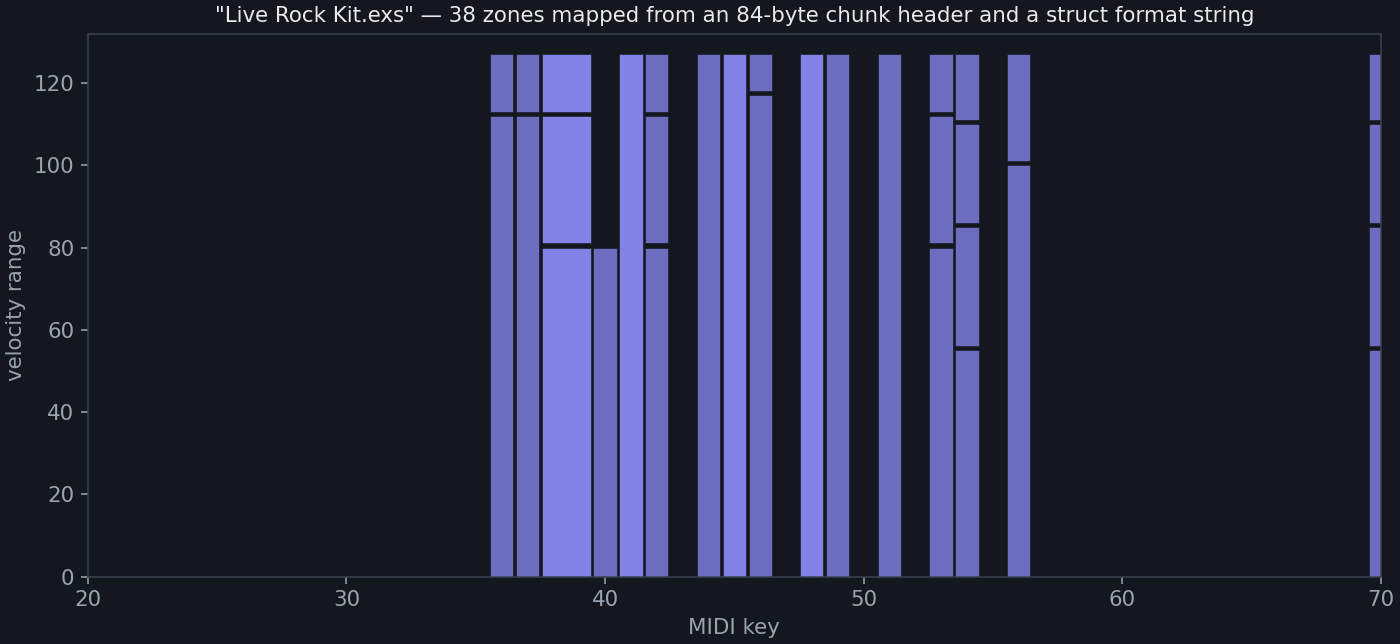
No guesswork anywhere: the zone says “MIDI key 38, velocities 80–112, frames 1,204,551–1,310,006 of sample file 0.” Slicing is exact.
Extracting the audio
The referenced audio is often a .caf container. On macOS the built-in
afconvert turns anything Core Audio reads into WAV (elsewhere, ffmpeg -i
in.caf out.wav does the same):
import subprocess
from scipy.io import wavfile

subprocess.run(["afconvert", "-f", "WAVE", "-d", "LEI16@44100",
                "Live Rock Kit_consolidated.caf", "kit.wav"], check=True)
sr, x = wavfile.read("kit.wav")

for i, z in enumerate(zones):
    seg = x[z["start"]:z["end"]]           # frame-exact cut, no transient hunting
    wavfile.write(f"note{z['keylo']:03d}_v{z['vello']:03d}-{z['velhi']:03d}_{i:03d}.wav",
                  sr, seg)
Two field notes from running this against the whole factory library:
- Truncated names. The 64-byte name field truncates long sample names as
prefix#HASH.ext. When the exact name isn’t found on disk, fuzzy-match the prefix:find <root> -name "prefix*.ext". - Write a manifest. Dump each zone’s metadata (
root, key/vel ranges, filename) to amanifest.jsonnext to the extracted WAVs. Your render pipeline reads the manifest, not the filenames.
What you do with a manifest
A pitched multi-sample instrument is now ~20 lines away: for an incoming note,
pick the zone whose key/velocity range contains it, load its WAV, and
resample by 2 ** ((note - zone_root) / 12) to pitch it. That’s the entire
trick inside every sampler you’ve ever bought. Velocity layers come free —
the zone map already encodes which hit is soft and which is a rimshot.
In my pipeline this powers a Steinway, a Mellotron (real tape banks!), and a
Brooklyn-tracked drum kit, all rendered headlessly next to the
VST3 amp rigs and
FluidSynth buses from earlier in this series.
The final post puts the whole band in one script —
a complete, mixed, mastered track from python3 generate.py.